
If you have ever picked up a phone that feels uncomfortably warm after an hour of gaming, or noticed your laptop fan suddenly roaring to life during a heavy task, you have already experienced the real-world impact of temperature on technology. Heat is one of the most persistent challenges in electronics it affects everything from how fast your processor runs to how long your battery lasts. Understanding how temperature works, why it builds up inside devices, and what engineers and everyday users can do about it is genuinely useful knowledge whether you are a tech enthusiast, a professional, or just someone who wants their devices to last longer. This guide covers all of that and more, with practical insights for technology users at every level.
What Is Temperature and How Does It Work?
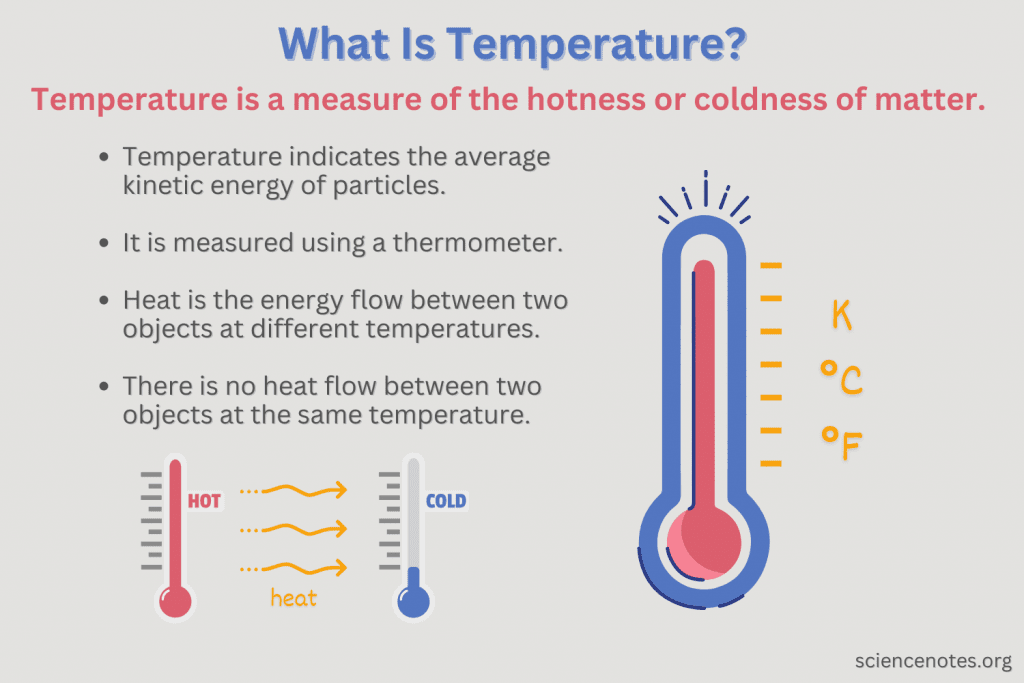
At its most basic level, temperature is a measurement of thermal energy specifically, how fast the atoms and molecules inside an object are moving. The faster they move, the higher the temperature. When you touch something hot, you are essentially feeling the transfer of that kinetic energy from the object to your hand.
In technology, this matters enormously because electronic components generate heat as a natural byproduct of doing work. Every time a processor calculates something, every time electricity flows through a circuit, some of that energy is released as heat. The challenge for engineers is managing that heat before it causes problems.
Three main temperature scales are used across science and industry:
Celsius (°C) is the global standard used by most countries and virtually all scientific fields outside the United States. Water freezes at 0°C and boils at 100°C.
Fahrenheit (°F) is still commonly used in the United States for everyday temperature readings, though Celsius dominates in technical contexts even there.
Kelvin (K) is the scale used in physics and scientific research. It starts at absolute zero the theoretical point at which all molecular movement stops which is -273.15°C. Engineers working with semiconductors and advanced materials frequently use Kelvin in their calculations.
How Temperature Is Measured in Technology
Modern technology relies on a variety of precision instruments to measure temperature accurately. The right tool depends on the application measuring the surface temperature of a processor chip requires very different equipment than monitoring the ambient temperature of a server room.
Digital Temperature Sensors are by far the most common solution in consumer electronics. They are small, inexpensive, and incredibly accurate, providing real-time readings that software can use to trigger cooling responses automatically. Your smartphone, laptop, and gaming console all contain multiple digital temperature sensors.
Infrared Thermometers measure temperature without making physical contact with the object. They work by detecting infrared radiation emitted by a surface. Engineers use them to spot hot areas on circuit boards or identify overheating components during testing.
Thermocouples work by measuring the voltage difference between two different metals joined at a point. They are highly durable and accurate across a very wide temperature range, making them the preferred choice in industrial environments and high-performance computing applications.
Resistance Temperature Detectors (RTDs) are among the most accurate temperature sensors available. They work by measuring how electrical resistance changes as temperature changes. They are commonly used in precision scientific instruments and high-end industrial equipment where accuracy is critical.
Why Temperature Matters So Much in Technology
Heat is the enemy of electronics. This is not an exaggeration it is one of the fundamental truths of electrical engineering. Understanding exactly why temperature matters so much helps explain the enormous amount of effort that goes into managing it.
Processors and Computing Performance
Modern processors whether in laptops, desktops, or smartphones are extraordinarily complex. A high-end CPU can contain billions of transistors packed into a chip the size of a fingernail. When all those transistors are switching on and off billions of times per second, they generate a remarkable amount of heat.
When a processor gets too hot, it does something called thermal throttling it deliberately slows itself down to reduce heat output and protect itself from damage. This is why your computer might feel sluggish during intensive tasks if the cooling system is not keeping up. The processor is not broken it is just protecting itself.
Keeping processors cool allows them to run at their designed speeds consistently. This is why serious gamers and content creators invest in high-quality cooling solutions liquid cooling loops, large tower heatsinks, and high-airflow cases all exist specifically to keep temperatures low and performance high.
Data Centers and Server Infrastructure
Data centres are where the temperature challenge truly reaches industrial scale. A large data centre might contain tens of thousands of servers running continuously, every single one of them generating heat. The total heat output of a major facility can be staggering equivalent to hundreds of homes combined.
Managing this heat is not just a technical challenge, it is a massive operational cost. Cooling systems in data centres consume enormous amounts of electricity in some facilities, cooling accounts for nearly half of total energy usage. This is why the technology industry has invested billions into more efficient cooling approaches. Modern data centres use a combination of precision air conditioning, hot aisle and cold aisle containment systems, liquid cooling for the densest server racks, and increasingly, direct liquid cooling where coolant flows directly over the chips themselves. Some companies have even experimented with submerging entire servers in dielectric fluid a non-conductive liquid that absorbs heat far more efficiently than air.
The environmental impact of all this cooling has also driven innovation. Many major data centres now locate themselves in cooler climates Iceland, Norway, and northern Sweden are popular locations partly because the cold ambient air reduces cooling costs significantly. For more on how technology infrastructure is evolving, check out our breakdown of Cyber Security Jobs in 2026 and how the growing digital infrastructure is creating new career opportunities.
Smartphones and Consumer Electronics
Your smartphone is a genuinely impressive feat of thermal engineering. It packs a processor that would have been considered supercomputer-level performance just a decade ago into a device thinner than your finger — with no fan and no active cooling whatsoever.Managing temperature in that environment requires careful design at every level. The processor is designed to throttle performance when temperatures rise. The back panel of many premium smartphones is made of materials chosen partly for their heat-dissipation properties. Batteries are particularly temperature-sensitive both very high and very low temperatures reduce battery capacity and accelerate long-term degradation.
This is why your phone’s battery seems to drain faster in winter, and why leaving your phone in a hot car is genuinely bad for it not just uncomfortable.
What Causes Devices to Overheat
Understanding the root causes of overheating helps you prevent it. Most overheating problems come down to one of a handful of common causes:
Heavy Processor Load is the most common cause. Running demanding applications video editing, gaming, large file transfers, or running multiple programs simultaneously pushes the processor hard and generates significant heat.
Poor Ventilation is extremely common and easily preventable. Using a laptop on a bed, sofa, or pillow blocks the bottom vents and traps heat. Devices need airflow to cool themselves blocking that airflow is like putting your hand over a fan.
Dust Accumulation is a silent killer of electronics. Over time, dust builds up on fans, heatsinks, and vents, reducing their effectiveness significantly. A heavily dust-clogged cooling system can cause temperatures to rise by 20-30°C in severe cases.
High Ambient Temperature plays a bigger role than most people realise. A device that runs perfectly in a 20°C room might overheat in a 35°C room doing exactly the same tasks, because the cooling system can only reduce temperature relative to the surrounding air.
Ageing Thermal Paste is a common issue in older laptops and desktops. Thermal paste is applied between the processor and the heatsink to improve heat transfer. Over several years, it dries out and becomes less effective causing temperatures to creep up even with everything else functioning normally.
Practical Tips to Keep Your Devices Running Cool
You do not need to be an engineer to manage temperature effectively. These straightforward steps make a real difference:
Give Your Devices Room to Breathe Always use laptops on hard, flat surfaces that allow air to circulate freely underneath. If you regularly use a laptop in bed, invest in a laptop stand or cooling pad they are inexpensive and make a genuine difference.
Clean Your Devices Regularly For desktops and laptops, using compressed air to blow dust out of vents and fans every six to twelve months can significantly reduce running temperatures. It is one of the cheapest and most effective maintenance steps available.
Monitor Your Temperatures Free software tools like HW Monitor, Core Temp, and MSI Afterburner let you see exactly how hot your components are running in real time. Knowing your baseline temperatures makes it much easier to spot when something is going wrong.
Manage Background Processes Applications running in the background consume processor resources and generate heat even when you are not actively using them. Closing unnecessary programs reduces the load on your processor and keeps temperatures lower.
Consider Reapplying Thermal Paste If your laptop or desktop is more than four or five years old and running hotter than it used to despite being clean, reapplying fresh thermal paste between the processor and heatsink can bring temperatures down substantially.
The Future of Temperature Management in Technology
Temperature management is an area of active and exciting research. As processors become more powerful and devices become more compact, the challenge of keeping everything cool only intensifies and the solutions being developed are genuinely fascinating.
Liquid Metal Thermal Interface Materials are beginning to replace traditional thermal paste in high-performance applications. They conduct heat far more effectively, though they require careful application because liquid metal is electrically conductive.
Vapour Chamber Cooling is already used in premium smartphones and is spreading into laptops. A vapour chamber is a sealed flat chamber containing a small amount of liquid that evaporates where heat is generated, spreads across the chamber as vapour, and condenses at the cooler edges transferring heat remarkably efficiently.
AI-Driven Cooling Systems are being deployed in data centres to optimise cooling in real time. Rather than running cooling systems at a fixed capacity, AI systems continuously monitor temperatures across thousands of points and adjust cooling precisely where and when it is needed reducing energy waste significantly.
Immersion Cooling submerging components directly in non-conductive liquid is moving from experimental to practical in the most demanding computing environments. It offers dramatically better heat transfer than air cooling and enables much higher component densities. You can learn more about how the digital infrastructure that relies on these systems is secured in our article on what the Dark Web is and how it works a topic deeply connected to the security of the very data centres we have discussed here.
Frequently Asked Questions Temperature in Technology
Q1: What is a safe operating temperature for a laptop processor? Most laptop processors are designed to operate safely up to around 95-100°C, but sustained temperatures above 85°C are generally considered high and may indicate a cooling problem. Ideally, under normal use, a laptop processor should stay below 75°C.
Q2: Why does my phone get hot when charging? Charging generates heat because energy is being converted and stored in the battery. Fast charging generates more heat than standard charging. Some warmth during charging is completely normal it only becomes a concern if the phone becomes uncomfortably hot to hold or shows an overheating warning.
Q3: Can cold temperatures damage electronics? Yes. Extreme cold can cause condensation to form inside devices when brought into a warm environment, which can damage components. Batteries also lose capacity in cold temperatures this is why phone batteries seem to drain faster in winter.
Q4: What tools can I use to monitor my computer’s temperature? HW Monitor, Core Temp, MSI Afterburner, and the built-in Task Manager in Windows 11 all provide processor temperature readings. For a comprehensive overview of all components, HW Monitor is particularly useful.
Q5: How does thermal throttling work? When a processor reaches its maximum safe temperature, it automatically reduces its operating speed to generate less heat. This protects the hardware from damage but reduces performance. If your computer is throttling frequently, it usually indicates a cooling problem that needs addressing.
Q6: Is liquid cooling worth it for a desktop PC? For high-performance builds running demanding workloads gaming, video editing, 3D rendering liquid cooling offers quieter operation and lower temperatures than most air cooling solutions. For light to moderate use, a quality air cooler is usually sufficient and more cost-effective.
Q7: How often should I clean dust from my computer? Every six to twelve months is a reasonable general guideline for most environments. If you have pets or live in a dusty environment, every three to four months may be more appropriate.
Final Thoughts
Temperature is one of those technical topics that affects every device you use every single day, yet most people never think about it until something goes wrong. The truth is that a basic understanding of how heat builds up in electronics, why it matters, and what you can do about it puts you in a genuinely better position to take care of your technology and get more out of it. From the processor in your pocket to the servers powering the websites you visit, temperature management is happening constantly and invisibly a silent battle between the heat that electronics generate and the systems designed to carry it away. As technology continues to evolve and push the boundaries of what is possible in smaller and smaller packages, that battle will only become more interesting to follow.
For more in-depth technology coverage, explore our latest articles on Connections Hint Today and other trending technology topics on Publish Time. For official scientific reference on temperature measurement standards, visit NIST — National Institute of Standards and Technology.
[…] to decode hidden patterns much like understanding how systems work, as explored in our article on how temperature works in technology is genuinely valuable in everyday […]